01 / NEUROGLEE — CONNECTED CARE
Care is connected.
The experience
should be, too.
Designing a dementia care platform around three people who need different things from the same system.
Explore the design ↓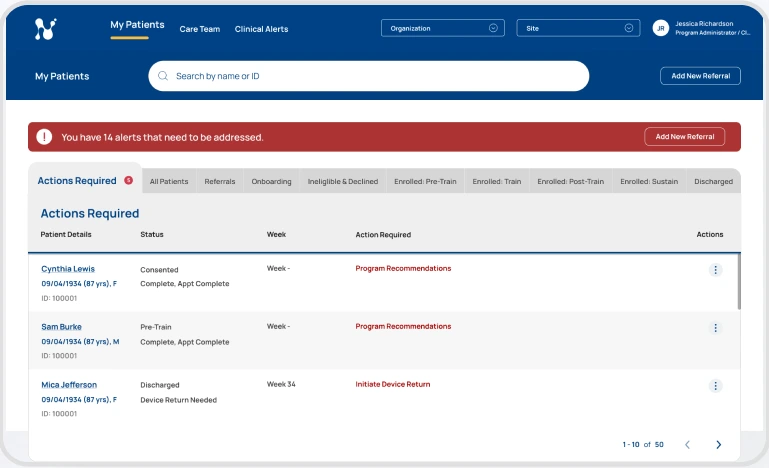
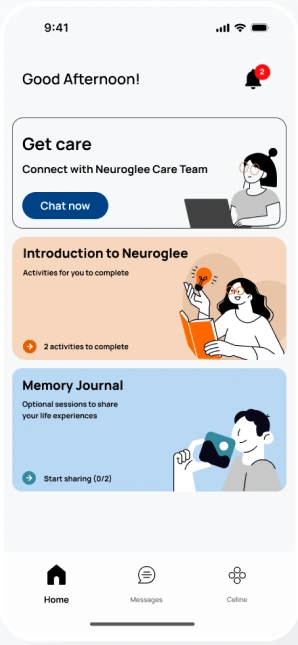
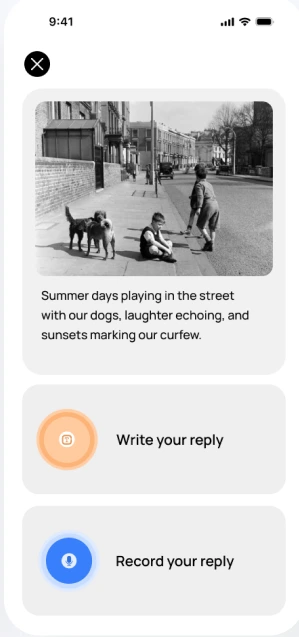
Actual interface designs from the project. Mobile screens and clinician dashboard.
01 / THE CHALLENGE
The hardest part of care
happens between visits.
A diagnosis is a starting point.
Families still need a way
to navigate the everyday.
Patients needed support they could use independently. Caregivers needed to understand what was happening at home. Clinicians needed visibility into changes between appointments.
I joined Neuroglee as its founding product designer, shaping the experience across patient and caregiver mobile apps and a clinical dashboard—from early concepts and flows to prototypes, interface design, and developer handoff.
The design challenge was to connect these experiences without giving everyone the same information, or the same amount of it.
Discovery → flows → prototypes → UI → handoff
Boston · Bangalore · Singapore
Different workflows, consistent interaction patterns
02 / DISCOVERY & RESEARCH
Three perspectives.
Three definitions of clarity.
Understand the person
before simplifying
the interface.
Discovery combined 12 interviews across patients, caregivers, and clinicians, contextual inquiry with care teams, a competitive review of digital care tools, and an accessibility review. The focus extended beyond visual legibility to memory, confidence, and the effort required to complete a task.
These insights shaped three primary user needs. They became a practical lens for deciding what each experience should prioritise.
PATIENT
“Help me do this
for myself.”
Maintain independence and dignity while navigating memory difficulties and unfamiliar interactions.
Familiar routines, plain-language labels, and a clear next action.
CAREGIVER
“Help me know
how they’re doing.”
Stay informed between visits without piecing together calls, messages, and disconnected information.
Meaningful summaries and clear routes to the care team.
CLINICIAN
“Show me who
needs attention.”
Review a patient panel efficiently and understand the changes that require action.
Prioritised patient lists, relevant trends, and a path to resolution.
The statements above summarise research themes; they are not verbatim participant quotes.
03 / DESIGN STRATEGY
Less to interpret.
More confidence to act.
Dignity over dependency.
Frame activities as meaningful parts of daily life. Support patient agency through clear choices and positive reinforcement.
Signal before detail.
Give clinicians a prioritised overview, then let them investigate. Give caregivers an understandable summary, rather than a wall of raw data.
Accessibility in the flow.
Use larger targets, text labels, and predictable interactions. Reduce the number of things a person must remember from one screen to the next.
Consistency without sameness.
Reuse components and behaviour across the platform while allowing information density and tone to match each user’s needs.
04 / THE PRODUCT EXPERIENCE
One system.
Designed around people.
A / PATIENT EXPERIENCE
A clear place
to start the day.
The patient home brings care-team access, introductory activities, and the Memory Journal into a familiar starting point. Content is broken into approachable activities, with explicit labels and visible actions.
Recognition places less demand on memory than asking someone to reconstruct where they were or what to do next.
B / ITERATION THROUGH FEEDBACK
Make participation
feel manageable.
Feedback highlighted difficulty with scrolling and touch interaction. The design introduced paginated prompts to reduce scrolling and make progression more explicit.
In the Memory Journal, a photo anchors the activity and a person can write or record a response. The interaction supports different levels of comfort with typing.
Show less at once, with more deliberate steps. Prioritise a clear task over fitting more content onto a screen.
INFORMATION ARCHITECTURE / TWO CONNECTED WORKFLOWS
Make the next step
easy to understand.
Patient / a Memory Journal activity
- HomeA familiar starting point
- Memory JournalChoose an activity
- Photo promptRecognise a memory
- Write or recordChoose a response method
- Session completeA clear end state
Clinician / an alert that needs action
- Alerts panelSee active concerns
- Alert typeClinical or system
- Resolution formSelect a category
- Add notesDocument the action
- Resolved & recordedUpdate the alert history
Condensed from the project’s user flows. Each journey has its own task structure while remaining part of a shared care system.
C / CAREGIVER EXPERIENCE
Reassurance,
without surveillance.
Caregivers need context, not another dashboard to interpret. The caregiver experience was organised around wellbeing summaries, practical education, and meaningful notifications.
The intent was to make a check-in useful: what happened, what needs attention, and how to reach the care team. Information density differs from the clinician experience while remaining part of the same care system.
Caregiver design direction from the project case study. The mobile screens shown above represent the patient experience.
D / CLINICIAN EXPERIENCE
From a wall of data
to a starting point for action.
The important question:
Who needs me now?
The earlier dashboard made the clinical team work to assemble a picture of a patient. I used interactive prototypes to guide discussions with clinicians and refined the design around the information they needed to act.
The redesign brings attention to required actions, patient status, and relevant measures. A flatter information structure reduces the distance between the panel view and patient detail.
Patient panel / before & after
Surface patients requiring attention at the panel level.
Open patient detail to understand context and trends.
Support a clear action and maintain an alert history.
Look closer: organising patient measures +
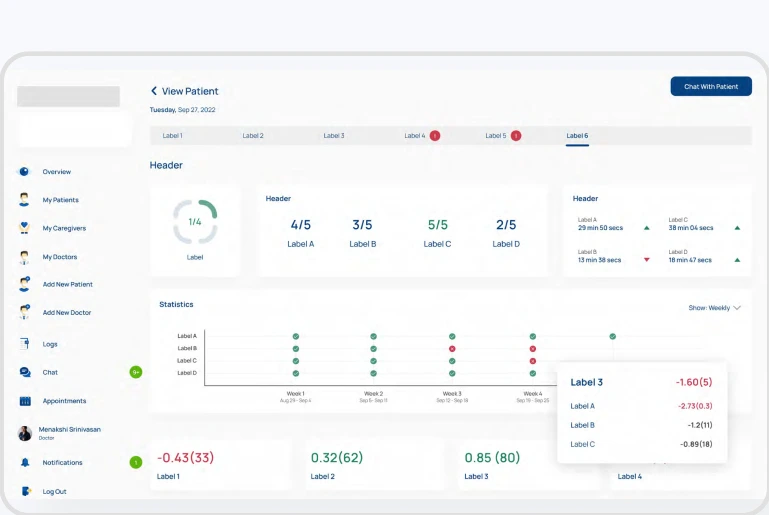
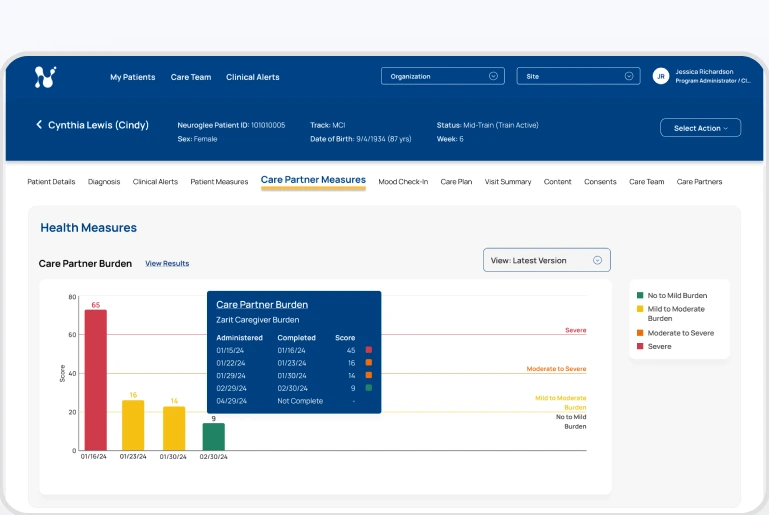
The team reviewed which measures belonged in the dashboard as the data being tracked evolved. The revised view provides context for interpreting a result, rather than presenting numbers alone.
05 / DESIGN SYSTEM & DELIVERY
A shared language.
Room for different needs.
Consistency is a form
of reassurance.
I built a component library to make repeated interactions familiar and support a coherent experience across products. Cards, response controls, messaging patterns, and activity components create reusable foundations for design and handoff.
Warm imagery and approachable content give the patient experience a human tone. The clinical dashboard uses denser, structured views suited to comparison and review.
Labels, actions, and feedback that work consistently.
Readable text, larger targets, and manageable steps.
Reusable components supporting implementation and iteration.
06 / OUTCOMES & REFLECTION
Clearer interactions.
A more connected experience.
Reported usability gain
Across task success, efficiency, and error reduction.
Less navigation depth
Following the dashboard information-architecture overhaul.
Connected experiences
Patient, caregiver, and clinician products, supported by a shared system.
UX figures are reported in the original project case study. Its supporting sample sizes and measurement protocol are not included in the supplied materials. These figures describe product usability, not clinical efficacy.
WHAT I TOOK FORWARD
The most important decisions
were often about what to remove.
Designing for vulnerability demands restraint. Fewer competing actions. Less data to decode. Clearer next steps. Every interaction has to earn its place by serving the person using it.
Working across three experiences also reinforced the value of a shared system: consistency makes the product easier to learn, and gives teams a stronger foundation for iteration.